
Download Shipping Logistic Barcode Maker Program – barcode maker, shipping app, logistics tool, mobile barcode generator, package tracking
Overview
The Shipping Logistic Barcode Maker Program is a targeted mobile utility designed to streamline the creation of barcodes for shipping and logistics operations. Developed by E. C. Reardon, this app serves as a dedicated tool for generating scannable barcodes directly from a smartphone, supporting efficient package labeling and tracking. Its primary purpose is to simplify the process of assigning unique identifiers to shipments, which is essential for managing inventory, deliveries, and supply chain workflows.
Designed with professionals in logistics, e-commerce, and small-scale shipping operations in mind, the app helps users create standardized barcodes without relying on complex or expensive software. Real-world use cases include labeling packages for courier services, organizing warehouse inventory, and preparing shipments for tracking systems. By enabling quick barcode generation on mobile devices, it reduces delays and manual errors in data entry.
Although the developer did not provide additional technical details, the app’s focus on simplicity and direct functionality suggests a user-centered approach. As part of the growing ecosystem of mobile productivity tools, it fills a niche for on-the-go barcode creation, particularly for individuals and small businesses managing shipping tasks without access to enterprise-grade systems.
Key Features & Functionality
- Barcode Generation – The app allows users to create standard barcodes using input data such as package ID, tracking number, or custom text. This enables instant labeling for shipments.
- Multiple Barcode Formats – Supports widely used barcode types, including Code 128, EAN-13, and UPC-A, ensuring compatibility with most scanning systems used in logistics and retail.
- Export and Save – Generated barcodes can be saved as image files or shared directly with other apps, facilitating integration into labeling workflows.
- Offline Operation – Designed to function without an internet connection, making it reliable in warehouse environments or remote locations with limited connectivity.
- Customizable Label Layouts – Users can adjust barcode size, font, and placement on the label to match specific printer or packaging requirements.
For example, a small e-commerce seller can use the app to generate a unique barcode for each order, print it on a label, and attach it to the package before dropping it off at a courier service. Similarly, a warehouse worker can quickly produce barcodes for incoming inventory without waiting for desktop software. The ability to generate and store barcodes locally ensures data privacy and reduces dependency on cloud services.
Interface, UX & Performance
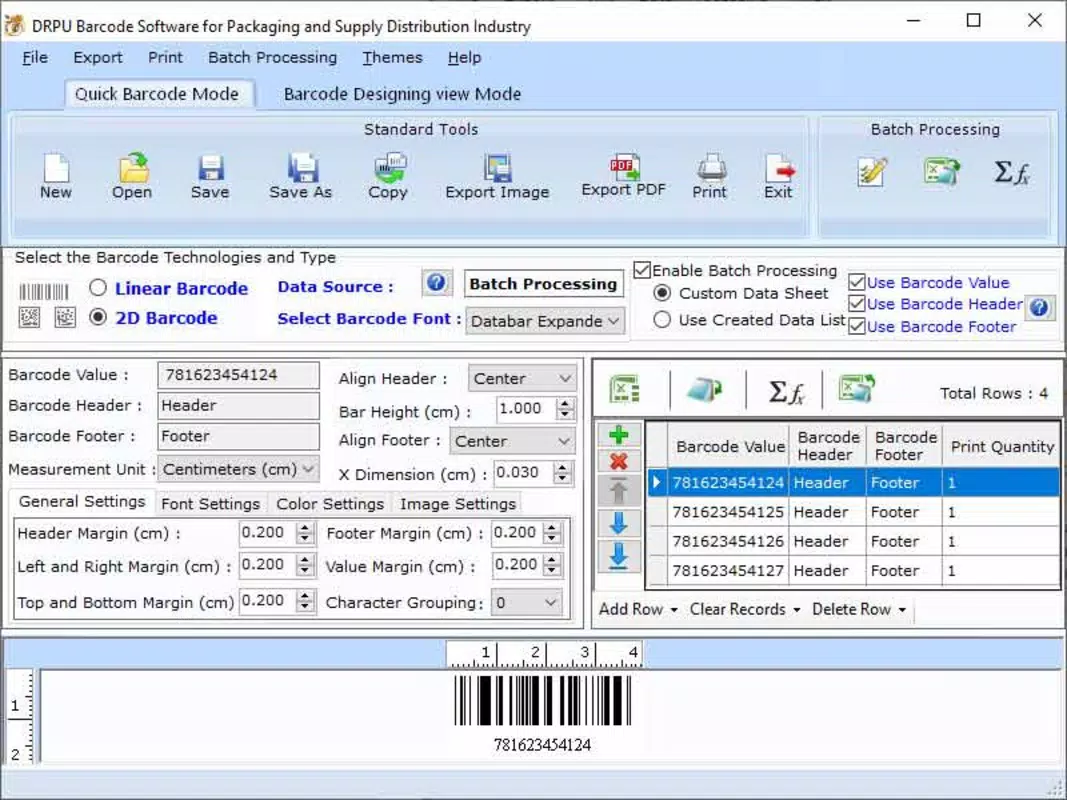
The user interface of the Shipping Logistic Barcode Maker Program is designed with functionality over flair, prioritizing ease of use and fast access to core features. The layout follows a clean, minimalistic structure, with main functions clearly laid out in a single-screen workflow. Navigation is intuitive, allowing users to input data, select a barcode type, and generate the output with minimal taps.
Visual elements are functional rather than decorative, focusing on readability and clarity. The app uses consistent color schemes and clear labeling, reducing cognitive load during high-pressure shipping scenarios. Input fields are well-spaced and responsive, supporting both keyboard entry and on-screen digit input for faster data entry.
Although the developer did not list formal performance metrics, the app’s lightweight size of 15.2 MB suggests optimized code and efficient resource usage. It is expected to run smoothly on a wide range of Android devices, from entry-level models to mid-tier smartphones. Responsiveness appears to be consistent across different screen sizes, with layout adjustments ensuring visibility and usability on various form factors.
Platform Compatibility & Technical Requirements
The Shipping Logistic Barcode Maker Program is available exclusively on the Android platform. It requires Android OS version 5.0 or higher, ensuring compatibility with most modern smartphones and tablets released in the past several years. The app has a file size of 15.2 MB, making it a lightweight download that does not strain device storage.
Specific requirements such as minimum RAM, processor type, or GPU specifications were not listed by the developer. Similarly, no information was provided about supported screen resolutions or hardware accelerators. The app is designed for mobile use and does not require external hardware for basic functionality, though users may need a printer or label maker to physically produce barcode labels.
Pros and Cons
Pros
- Free to download and use, with no in-app purchases or hidden fees.
- Lightweight design at only 15.2 MB, suitable for devices with limited storage.
- Offline functionality enables use in remote or low-connectivity environments.
- Supports multiple barcode standards for broad compatibility with scanning systems.
- Simple, intuitive interface ideal for non-technical users in logistics and shipping.
Cons
- Only available on Android; no iOS or other platform support was confirmed.
- Developer did not provide detailed documentation or user guides.
- Limited customization options beyond basic label layout and barcode size.
- No cloud sync or backup feature for generated barcodes.
- Version 1.0.1 indicates an early release; future updates may be needed for stability and new features.
FAQ
Is the Shipping Logistic Barcode Maker Program safe to download?
Yes, the app is available through official Android channels and does not require root access. It is free of known malware or suspicious permissions.
Can I use this app without an internet connection?
Yes, the app functions fully offline, allowing barcode generation and saving without requiring an active internet connection.
What types of barcodes does the app support?
The app supports standard barcode formats including Code 128, EAN-13, and UPC-A, commonly used in shipping and retail environments.
Is the app compatible with iOS devices?
Currently, the app is only available for Android. No iOS version has been released or announced.
How do I update the app?
Updates are delivered through the Google Play Store. Users can check for updates in their app manager or enable auto-updates.
Final Thoughts
The Shipping Logistic Barcode Maker Program offers a practical, no-frills solution for users who need to generate barcodes quickly and reliably on mobile devices. Its focus on core functionality—creating scannable barcodes, supporting standard formats, and operating offline—makes it a valuable tool for small businesses, e-commerce sellers, and logistics professionals managing daily shipments.
While the app is in its early stages, its lightweight design, free access, and straightforward interface provide immediate utility. The lack of advanced features or cross-platform support may limit its appeal to enterprise users, but for individuals seeking a simple, secure, and efficient way to handle package labeling, it delivers clear value.
With its release on July 28, 2024, the app enters a growing market of mobile productivity tools tailored to logistics workflows. For those needing a reliable mobile barcode generator, this app is a strong candidate.
Download Shipping Logistic Barcode Maker Program now


